
01 / ABOUT THE TOOL
Why does Cursor use local disk space?
Cursor
Understand code · Build features · Work with AgentsCursor is an AI coding tool for understanding code, building features and fixing issues. Beyond project files, everyday use also creates the following local data.
Everyday startup and loading
The interface, scripts and rendering create caches that may be regenerated during later use.
Updates and ongoing development
Diagnostic logs, update downloads and old CLI versions can accumulate over time.
Chats and Agent tasks
History, workspace state and checkpoints support task continuation and recovery and need separate consideration.

AgentClean groups cleanup items under Cursor. Review paths, sizes and risk labels in one list.
Stay tuned
AgentClean is currently available only for Mac. Other platforms aren’t available yet. Visit this site on a Mac to download.
02 / CLEANUP SCOPE
Which Cursor data can AgentClean clean?
The main scope covers these four categories. Expand a card for locations and filters. Actual items depend on the Cursor version, usage and access permissions.
App and rendering caches
Regenerable interface, script and rendering caches. The first load after cleaning may be slower, and some caches will return with use.
View locations and cleanup conditions
Fully quit Cursor first. CachedExtensions is an extension cache, not the installed extensions folder ~/.cursor/extensions.
Cache / Code Cache / GPUCache / CachedDataDawnGraphiteCache / DawnWebGPUCacheCachedExtensions / Service Worker/CacheStorage~/Library/Caches/CursorRuntime and diagnostic logs
Runtime and diagnostic records you no longer need. Keep relevant logs while reporting a problem to support.
View locations and cleanup conditions
App logs and Agent worker *.log files are filtered to those older than 30 days; ~/Library/Logs/Cursor does not use this age condition.
logs / ~/Library/Logs/CursorUser/globalStorage/anysphere.cursor-agent-worker/*.logUpdate download leftovers
Downloaded files left after an update. Confirm the new version starts normally before removing unneeded leftovers.
View locations and cleanup conditions
The two update locations below are filtered to items older than 7 days. Wait for any update download or installation to finish first.
~/Library/Caches/com.todesktop.230313mzl4w4u92~/Library/Application Support/Caches/cursor-updaterOld CLI versions and temporary files
Old CLI versions and temporary installation files. Filtering protects the current version and keeps recent versions. Preserve files needed for troubleshooting.
View locations and cleanup conditions
Also checks .tmp-* temporary directories older than 24 hours and cli-config.json.bad files left by damaged configuration. It does not delete the whole ~/.cursor folder.
~/.local/share/cursor-agent/versionsversions directory of the built-in Agent CLI~/.cursor/cli-config.json.badPath note: locations without a ~/ prefix are relative to ~/Library/Application Support/Cursor/. These identify items; do not use them as instructions to delete whole directories.
03 / ASSESS THE RISKS
Review this data before cleaning
The following caution items may also appear in scan results. They affect chat access, task continuation or rollback of changes and must not be treated like ordinary caches.
Database recovery backup
User/globalStorage/state.vscdb.backupDeleting it removes this recovery copy. Confirm the main database works before deciding; copy it to another disk if you need to keep it.
Workspace state
User/workspaceStorageContains workspace state, extension data and some chat-related information. Deleting it may prevent past conversations from opening.
Local file history
User/HistoryDeleting it removes local older versions. Git may not contain these changes. Keep it if you need to roll back.
Agent checkpoints
snapshotsAfter deletion, you cannot roll back through these checkpoints. Commit or back up important changes first.
Subagent data
~/.cursor/subagentsMay contain task records or outputs. Keep ongoing task data and anything whose purpose is unclear.
Current rules do not target the main chat database state.vscdb, installed extensions in ~/.cursor/extensions, project working copies in ~/.cursor/worktrees, or the entire ~/.cursor folder for deletion. Do not manually empty User/globalStorage or the Backups folder holding unsaved content.
Deletion is permanent. Files do not go to Trash. Back up important content first. Deselect or protect items you are unsure about.
04 / PRODUCT INTERFACE
See Cursor scan review and protection
These screenshots show review before cleaning. Totals at the top and bottom combine several tools and do not represent space already freed from Cursor.
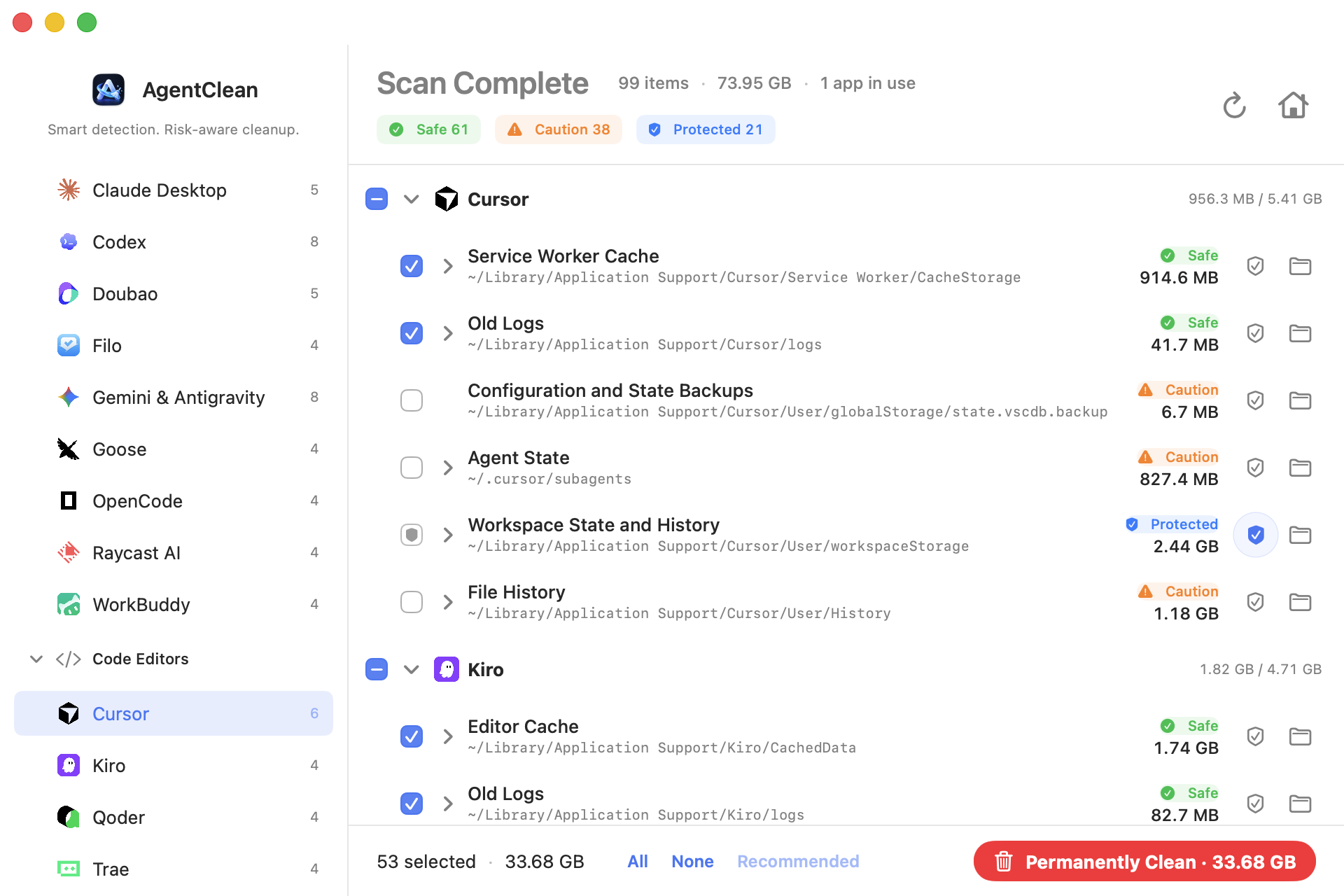
The Cursor group has 956.3 MB selected out of 5.41 GB scanned. Caches and old logs are selected, while workspace state is protected. This is still the selection before cleaning.
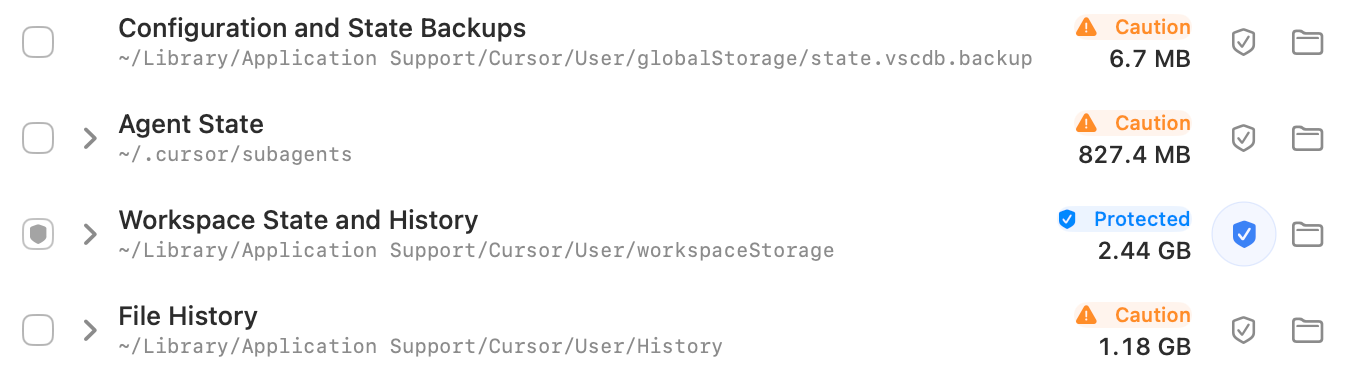
A detail from the same screenshot: workspace state is marked Protected; database backups, subagent data and file history remain unchecked.
05 / EXAMPLE AND FAQ
How do I clear caches while keeping chats?
This example selects only regenerable caches in four steps. History and recovery data stay intact, and other tools are excluded from this cleanup.
- 01
Quit Cursor and complete the scan
Save your work and quit Cursor, Agent and CLI processes. Open AgentClean, grant home-folder access when prompted and complete the scan.
- 02
Deselect everything, then select caches
Clear all selections, then expand Cursor. Select only verified regenerable caches such as Cache, Code Cache, GPUCache and CachedData.
- 03
Keep history and recovery data
Leave database backups, workspaceStorage, History, snapshots and subagents unchecked. Add protection for items you need to keep long term.
- 04
Review the list, then clean
Check that no other tools or caution items are selected before confirming permanent deletion. Reopen Cursor afterward and check that projects and chats you need still work.
This is a selection example, not a measured cleanup test. It does not compact the main chat database or guarantee a fixed amount of space recovered.
Manual guide / Keep your chat historyClearing Cursor caches? Know which chat data to keep.Find cache folders, distinguish them from chat databases and checkpoints, and verify available space after manual cleanup.Frequently asked questions
Does AgentClean compact the main chat database?
Current cleanup rules do not target the main state.vscdb database for deletion and do not promise lossless chat database compaction. If the database is large, measure it using the full guide, then check the built-in maintenance features available in your Cursor version.
Why do my scan results differ from this list?
Actual items depend on your Cursor version, features used, whether directories exist and AgentClean’s access permissions. If an item is shown as in use, quit the related processes and scan again. An item missing from the list does not prove the data does not exist.
Why is disk usage still high after clearing caches?
Most space may be used by chat databases, workspace data or project working copies. Clearing caches does not automatically shrink these. Locate the usage with the full guide before deciding whether to handle history data.
Is the scanned size the space I will recover?
No. Items you keep, protect or have in use may not be deleted, and some caches regenerate. Judge the result using successful, failed and skipped items on the completion screen together with the change in available Mac disk space.
Can I restore cleaned files from Trash?
No. AgentClean permanently deletes selected files without moving them to Trash. Back up important content before cleaning. Protection cannot restore files that have already been deleted.
Does this cover Cursor data on Windows or remote servers?
This page covers local Mac data, excluding Windows, Linux, remote SSH hosts and containers. Do not apply these Mac paths directly to other environments.
References
- Cursor official documentation
Used to verify Cursor’s code understanding, Agent development and review uses.
- Cursor official forum: macOS cache cleanup support reply
Used to verify Cache, CachedData, GPUCache and Code Cache paths and the requirement to fully quit the app.
- Cursor official forum: state.vscdb and database backup usage
Used to distinguish the main database from recovery backups and check the limits of built-in database maintenance.
- Cursor official forum: .pack eating up disk space
Used to verify that deleting snapshots removes checkpoints. The post concerns an older issue and does not establish that current versions have the same bug.
06 / DOWNLOAD
Clean Cursor with AgentClean
For macOS
Stay tuned
AgentClean is currently available only for Mac. Other platforms aren’t available yet. Visit this site on a Mac to download.