
01 / Tool overview
What do Codex desktop and CLI leave behind?
Codex
Understand code · Edit files · Run tasksCodex is OpenAI’s coding agent. It helps you understand code, edit files and run commands in the desktop app, terminal CLI and editors. These entry points leave different local data, and may share some configuration and task state.
Desktop app
The interface, built-in browser and updates leave caches, logs and download leftovers.
Codex CLI
Runs tasks from the terminal and stores configuration, logs and state under ~/.codex by default.
Project and task data
Sessions, plugins, working copies and deliverables matter for future use and cannot all be treated as caches.

AgentClean lists matching Codex items together. Review paths, sizes and risks, then choose what to clean.
Stay tuned
AgentClean is currently available only for Mac. Other platforms aren’t available yet. Visit this site on a Mac to download.
02 / Understand the cleanup scope
Which desktop caches and CLI logs are covered?
Coverage mainly includes the six categories below. CLI and desktop tasks may share directories; expand each item to see its paths and conditions. The group may be named Codex or ChatGPT & Codex, so confirm individual paths before acting.
Desktop and built-in browser caches
Page-loading, code and graphics-rendering caches. They may regenerate after cleanup, and the first opening of the relevant interface may be slower.
View locations and cleanup conditions
Covers rule-listed Cache, Code Cache and GPU/Dawn caches under Default, codex-browser-app and their partitions, plus component download caches. Only matching items are handled; the entire application data directory is not emptied.
~/Library/Caches/Codex/Default/Cache~/Library/Caches/Codex/Default/Code Cache~/Library/Caches/Codex/Default/Partitions/codex-browser-app/Cache~/Library/Caches/Codex/codex-browser-app/Cache~/Library/Application Support/Codex/Default/GPUCache~/Library/Application Support/Codex/Default/DawnGraphiteCache~/Library/Application Support/Codex/Default/DawnWebGPUCache~/Library/Application Support/Codex/component_crx_cache~/Library/Application Support/Codex/extensions_crx_cache~/Library/Caches/com.openai.sky.CUAServiceCLI and desktop diagnostic logs
CLI runtime logs, desktop logs and old crash reports. Keep relevant files when investigating an issue or providing information to support.
View locations and cleanup conditions
log, logs and desktop logs have no uniform age filter; matching old records in Crashpad and sentry/queue must be older than 30 days. Logs are not the same as chat history.
~/.codex/log~/.codex/logs~/Library/Logs/com.openai.codex~/Library/Application Support/Codex/Crashpad/{pending,completed,new,attachments}~/Library/Application Support/Codex/sentry/queueCLI and task temporary files
Temporary task files, Node REPL temporary data and old shell environment snapshots. End terminal and desktop tasks, then check whether the contents are still useful.
View locations and cleanup conditions
tmp and node_repl are handled by matched item; .tmp/git-* must be older than 24 hours and shell_snapshots older than 7 days. In the app directory, only BrowserMetrics-spare.pma is matched, not the entire Codex directory.
~/.codex/tmp~/.codex/node_repl~/.codex/.tmp/git-*~/.codex/shell_snapshots~/Library/Application Support/Codex/BrowserMetrics-spare.pmaUpdate and plugin installation leftovers
Staged content left by desktop update downloads and plugin installations. Confirm the update or plugin installation has finished and current features work.
View locations and cleanup conditions
PersistentDownloads must be older than 7 days. Installation staging must be older than 30 days and have an identifiable version no newer than the installed app. Marketplace rules only match specified staging directories older than 30 days, not installed plugin caches.
~/Library/Caches/com.openai.codex/org.sparkle-project.Sparkle/PersistentDownloads~/Library/Caches/com.openai.codex/org.sparkle-project.Sparkle/Installation~/.codex/.tmp/bundled-marketplaces/openai-bundled.staging-*~/.codex/.tmp/marketplaces/.staging/marketplace-{add,upgrade}-*Incomplete runtimes
Filters temporary runtimes left by interrupted installations. Complete Node or Python runtimes are not cleaned by this rule.
View locations and cleanup conditions
Must be older than 24 hours and have leftover names such as incomplete, tmp, temp or partial. Complete directories containing runtime.json and Node or Python dependencies are excluded. This is not an old Codex CLI version uninstaller.
~/.cache/codex-runtimesLocal file access caches
Local file caches generated during desktop use. Accessing the content again after cleanup may reread files or regenerate caches.
View locations and cleanup conditions
Only matching fsCachedData items older than 7 days are selected. This does not clean project code, chat databases or the entire com.openai.codex directory.
~/Library/Caches/com.openai.codex/fsCachedDataIn paths, ~ means the current user’s home folder; braces indicate alternative directories. These are default-location examples. Coverage of custom directories is not guaranteed if you change CODEX_HOME or log_dir. Judge the scanned items individually; do not delete entire directories.
03 / Assess the risk first
Decide which plugins, sessions and work results to keep
The following four categories may also be scanned, but require caution. Old file dates or cache in a directory name do not mean the contents are no longer needed.
Plugin caches and dependencies
~/.codex/plugins/cacheMay contain files required to run plugins. Deletion can affect plugins and require downloading or installing them again; current rules classify this as a caution item.
Preview and annotation sessions
~/Library/Application Support/Codex/artifact-sessionsItems older than 30 days may still contain preview or annotation state you need. Confirm they are no longer needed before removing them.
Task working files
~/Documents/Codex/*/*/workMore than 30 days old does not mean a task is finished. Confirm intermediate files are no longer used; this is not the Git worktrees directory.
Task outputs and deliverables
~/Documents/Codex/*/*/outputsThese may be documents, reports or other deliverables. Being older than 30 days does not make them useless; export or back up what you need first.
Current rules do not target ~/.codex/sessions, archived_sessions, history.jsonl, state databases, auth.json, config.toml, skills or worktrees for deletion. Do not empty all of ~/.codex or treat uncommitted worktree changes as caches.
Deletion is permanent; files do not go to the Trash. Export or back up important outputs first. Deselect or protect anything you are unsure about.
04 / Product interface
Review the Codex scan and protection interface
Screenshots show the review state before cleanup; top and bottom capacity totals include multiple tools. The Safe label on plugin caches differs from current rules; this page treats them as caution items.
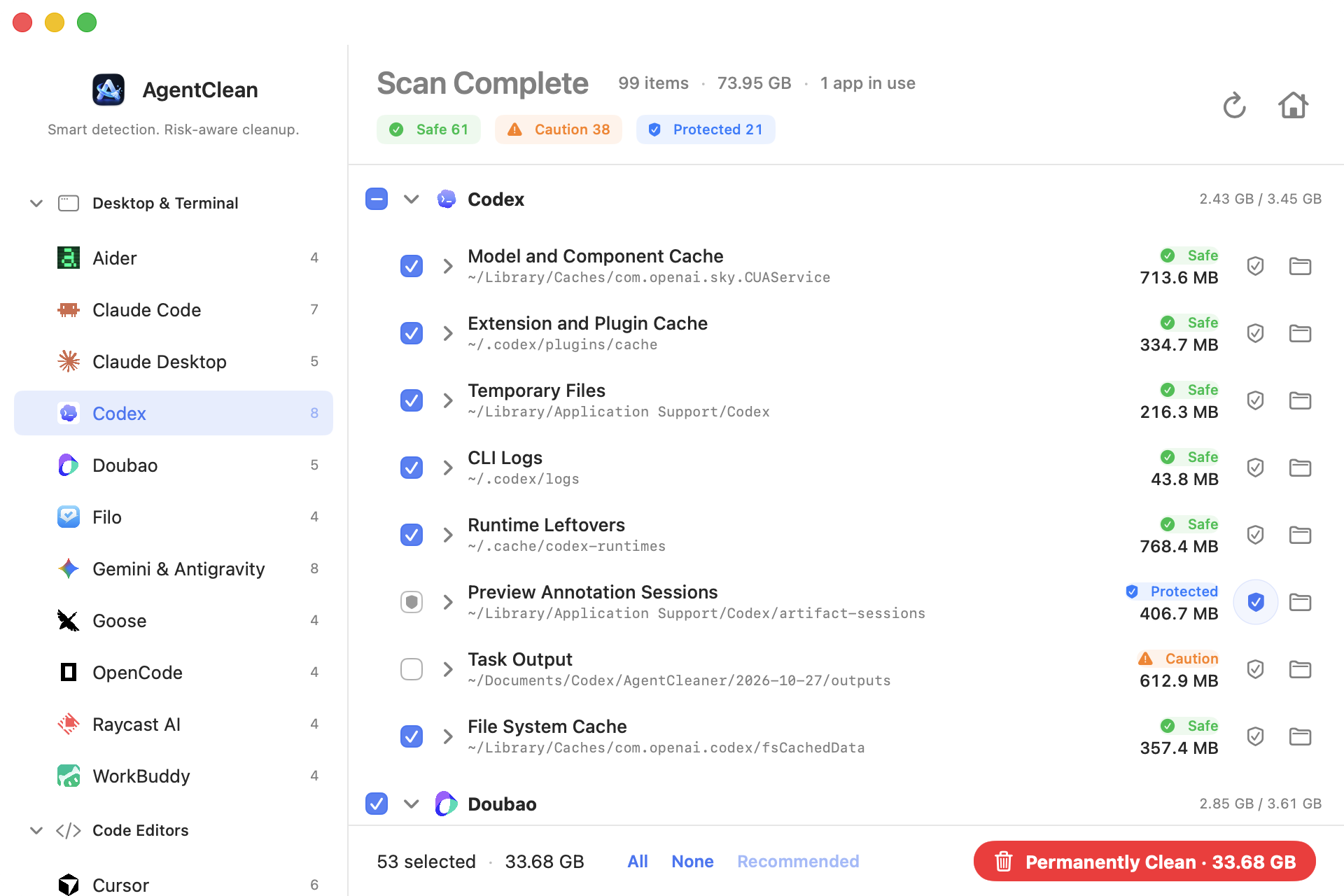
Expand the Codex group to review paths and selection states for CLI logs, temporary files, runtime leftovers and other items.

A detail from the same screenshot: preview annotation sessions are marked Protected and task outputs are unchecked.
05 / Example workflow and FAQs
How do I clean caches and logs while keeping sessions and results?
This example selects caches and logs confirmed to be unnecessary. If you only use the CLI, start with CLI logs that actually exist; having no desktop cache directories is normal.
- STEP 01
End desktop and terminal tasks
Save your files, stop Codex CLI, Codex tasks in your editor and related background tasks, then quit the desktop app. Open AgentClean, grant access as prompted and scan.
- STEP 02
Deselect all, then choose caches or logs
Find the Codex or ChatGPT & Codex group and identify Codex items by path. Select only desktop caches or CLI logs you have confirmed you no longer need, and deselect ChatGPT and other tools.
- STEP 03
Keep plugins and task results
Leave plugin caches, preview annotation sessions, work and outputs unchecked. Protect items you need to retain long term. Keep relevant logs while troubleshooting, too.
- STEP 04
Review the scope and verify after cleanup
Confirm the paths and selection before permanently deleting. Review the results, then open Codex or run the CLI and check that needed sessions, projects and plugins still work.
This demonstrates selection, not measured space savings. It does not organize chat databases or replace Codex’s own worktree management.
Manual guide / Disk usage and data to keepWhat is using Codex disk space, and what should you keep?Measure desktop and CLI directories, distinguish caches from sessions and worktrees, and check deletion risks before manual cleanup.Frequently asked questions
Is there anything to clean if I only installed Codex CLI?
Yes. Matching items such as ~/.codex/log, logs and tmp in default locations can be scanned, and old shell_snapshots have a rule too. Desktop caches appear only when their directories exist. This handles rule-matched local data, not CLI uninstallation or upgrades.
Can it scan a changed CODEX_HOME or log directory?
Coverage is not guaranteed. Codex supports changing its state directory with CODEX_HOME and its log location with log_dir. Current AgentClean rules use fixed default paths such as ~/.codex; this does not mean all custom locations are covered. If a directory is missing from results, confirm its real location and access permissions.
Can I continue existing chats and CLI sessions after cleanup?
Current rules do not target sessions, archived_sessions, history.jsonl, state databases or worktrees, but task working files, outputs and preview sessions may affect continued work. To retain context, select only confirmed caches or logs and keep caution items and project files. Do not empty all of ~/.codex.
Why do plugin caches require caution?
Having cache in the path does not mean deletion is harmless. ~/.codex/plugins/cache may contain installed plugins and their dependencies; retain plugins you still need. These differ from expired plugin installation staging directories under .tmp.
Will runtime cleanup delete the CLI I am using?
Runtime rules only select incomplete installation leftovers under ~/.cache/codex-runtimes that meet naming, age and completeness conditions. They do not bulk-delete CLI versions. Complete runtimes and the CLI installation itself are outside this rule; still end related tasks before cleanup.
Does scanned size equal space reclaimed, and can deletion be undone?
No. Actual reclaimed space depends on your final selection, protection, deletion results and cache regeneration; overview totals may include other tools. AgentClean permanently deletes selected files without moving them to the Trash. Back up important content first, then verify results against changes in available Mac storage.
Does this clean cloud tasks, remote hosts or Windows data?
This page only describes matching local Mac directories. It excludes data in cloud tasks, remote SSH hosts, containers, Windows and WSL. Codex’s supported environments and AgentClean’s directory coverage on Mac must be checked separately.
06 / Download
Clean Codex with AgentClean
For macOS
Stay tuned
AgentClean is currently available only for Mac. Other platforms aren’t available yet. Visit this site on a Mac to download.