

01 / Find disk usage
Where are Cursor caches and chat history stored on Mac?
Most user data is in ~/Library/Application Support/Cursor; extensions and other files may also be in ~/.cursor. ~ means your home directory. Adjust the paths if you use a custom --user-data-dir or remote development.
Cursor does not publish a “typical size” for each folder. The public examples below help show the scale; they are not averages, limits or promises of recoverable space. Items without reliable examples are explicitly marked “measure locally.” Not every version has every folder.
| Path | Contents | Size reference | Deletion impact |
|---|---|---|---|
~/Library/Application Support/Cursor/Cache~/Library/Application Support/Cursor/Code Cache~/Library/Application Support/Cursor/GPUCache~/Library/Application Support/Cursor/CachedData | Regenerable interface, script and rendering caches. | No official typical value; measure each with the commands below. | Safe with precautionsClean after quitting Cursor. The first launch may be slower and some resources will reload. ↗ |
~/Library/Application Support/Cursor/logs~/Library/Logs/Cursor | Runtime and diagnostic logs; paths vary by version. | About 90 MB in one public example; frequent errors can generate more. | Safe with precautionsOld diagnostics are lost. Keep relevant logs if you are reporting a problem to support. ↗ |
~/Library/Caches/Cursor | System cache folder used by some installations; it may not exist. | Measure locally; skip if absent. | Safe with precautionsConfirm it is Cursor’s cache, then quit the app before cleaning. It may regenerate. |
~/.cursor/extensions | Installed extension files, not a download cache. | Depends on extension count and dependencies; no standard typical value. | Requires another downloadExtension features stop working and require reinstallation. Prefer uninstalling unused extensions in the Extensions panel. |
~/Library/Application Support/Cursor/User/workspaceStorage | Workspace state, extension data and, in some versions, chat associations. | About 63 MB and 2.34 GB in two public examples. | Loses history / stateWorkspace state may be lost or old conversations may fail to open. Do not empty the whole folder. ↗ |
~/Library/Application Support/Cursor/User/globalStorage | Global state and extension data; state.vscdb contains chat and Agent data. | Main database about 12.38 GiB in one example; 37.98 GB in another Finder screenshot. | Loses history / stateDeleting the database loses local chats and related state. Prefer Cursor’s built-in maintenance command. ↗ |
~/Library/Application Support/Cursor/User/globalStorage/state.vscdb.backup | Recovery backup of the main database, sometimes left behind by certain versions. | About 12.18 GiB in one public example; it may be close to the main database size. | Loses a recovery copyDeleting it removes a recovery copy. Confirm the main database works first; move it to an external disk if needed. ↗ |
~/Library/Application Support/Cursor/User/History~/Library/Application Support/Cursor/Backups | Local file history and recovery data for unsaved content. | History is 312.9 MB in the Finder example; measure Backups yourself. | Loses history / recoveryOlder file versions or unsaved content may be lost. Downloading again cannot restore them. ↗ |
~/Library/Application Support/Cursor/snapshots | Agent checkpoints and .pack files saved by some versions. | In abnormal 2.6.x reports, a single .pack could reach about 0.5–1 GB or more. | Loses checkpointsYou lose rollback to the affected checkpoints. Handle only after confirming they are no longer needed. ↗ |
~/.cursor/worktrees~/.cursor/projects | Working copies and project data depending on version and features; not one generic cache bucket. | Depends on projects and task size; may greatly exceed caches. | May lose code / recordsMay contain unmerged code or task records. Check Git status, finish merging or back up first. |
Some paths contain others, so do not add every row together. For example, state.vscdb.backup is already included in the globalStorage total.
02 / Three inspection steps
Use measurements from your own Mac
Save your files, stop Agent and terminal tasks, then quit Cursor with ⌘Q. Run these commands in macOS Terminal. They only read disk usage, delete no files and require no sudo.
Step one: record total usage and available disk space
Save the output as a baseline before cleanup. du -sh summarizes folder usage; df -k shows space on the file system containing your home directory. Record Filesystem and Available.
df -k "$HOME"
for p in \
  "$HOME/Library/Application Support/Cursor" \
  "$HOME/Library/Caches/Cursor" \
  "$HOME/Library/Logs/Cursor" \
  "$HOME/.cursor"
do
  if [ -d "$p" ]; then du -sh "$p"; fi
done
Step two: find the largest top-level folders
Focus on User, snapshots, logs, and extensions and working copies under ~/.cursor. -d 1 expands only one level; the last line is the parent total, so do not count it twice.
if [ -d "$HOME/Library/Application Support/Cursor" ]; then
  du -h -d 1 "$HOME/Library/Application Support/Cursor"
fi
if [ -d "$HOME/.cursor" ]; then
  du -h -d 1 "$HOME/.cursor"
fi
Step three: check whether history accounts for most usage
If User is largest, inspect the global database, backups and workspace folders next. When the main database takes tens of GB and caches only a few hundred MB, clearing caches will not remove those tens of GB.
for p in \
  "$HOME/Library/Application Support/Cursor/User" \
  "$HOME/Library/Application Support/Cursor/User/globalStorage"
do
  if [ -d "$p" ]; then du -h -d 1 "$p"; fi
done
for p in \
  "$HOME/Library/Application Support/Cursor/User/globalStorage/state.vscdb" \
  "$HOME/Library/Application Support/Cursor/User/globalStorage/state.vscdb.backup"
do
  if [ -f "$p" ]; then du -sh "$p"; fi
done
Missing directories are skipped. Permission errors mean the measurement is incomplete, not that usage is zero. Keep the quotation marks: Application Support contains a space.
03 / Clean by consequence
Three safety levels: where should you start?
Regenerable caches and logs you no longer need
This covers the cache folders explicitly listed above and logs no longer needed for troubleshooting. “Safe” has conditions: save your work, quit the app completely and make sure the selected paths do not include User or the entire Cursor folder.
Installed extensions you no longer need
Prefer uninstalling them in Cursor’s Extensions panel, then quit Cursor. Deleting ~/.cursor/extensions directly disables extensions; you must reinstall them to use them again, and bundled components such as language servers may download again. Keep essential extensions before going offline.
Databases, workspace data, backups and checkpoints
Do not delete the entire globalStorage or workspaceStorage folder. History, Backups and snapshots may respectively contain older files, unsaved content and rollback points. worktrees may also contain unmerged code. Check Git status, commit or back up first, then manage them through the relevant feature.
Clean level A only: confirm each item in Finder
- Confirm you quit Cursor with ⌘Q and no Cursor process is still working in Activity Monitor.
- Press ⇧⌘G in Finder and enter
~/Library/Application Support/Cursor. - Select only the
Cache,Code Cache,GPUCache,CachedDataor old logs you intend to clean, then move them to the Trash. Check other cache paths individually using the table. - Review the items from this cleanup in the Trash and permanently delete them only after confirming they are no longer needed. Moving them to the Trash alone has not freed space. Start Cursor afterward and check that projects, extensions and chats work normally.
If state.vscdb accounts for the space, use built-in maintenance first
Export important conversations first. For a complete backup you can restore, quit Cursor and back up the relevant user data to an external disk. Exported text is not the same as a complete working state that can be imported again.
Reopen Cursor, press ⇧⌘P and search for GC Agent KV Blobs, called Developer: GC Agent KV Blobs in some versions. The official forum recommends it for removing Agent data no longer referenced by conversations and compacting the database. If the command is missing, check your version or contact Cursor support.
Compaction needs temporary working space. Requirements vary with version and database state; up to roughly twice the database size in free space may be needed. If the disk is full, first create headroom by safely moving other files away. Stop Agent tasks, wait for maintenance to finish, then quit Cursor completely and measure again. Data still referenced by valid chats will remain.
Developer: Delete Old Chats... permanently deletes conversations and related data by age, potentially including pinned chats. Use it only after exporting and confirming you no longer need them; read your version’s confirmation carefully. After deletion, check the GC command if further compaction is needed. Do not copy online SQL deletion instructions or empty database files directly.
04 / Verify cleanup results
How can you confirm disk space really returned?
Check both how much the target folder shrank and how much available space increased on the same volume. These numbers may differ. Keep Cursor closed and pause large downloads, builds and file copies to reduce interference from other disk writes.
df -k "$HOME"
for p in \
  "$HOME/Library/Application Support/Cursor" \
  "$HOME/Library/Caches/Cursor" \
  "$HOME/Library/Logs/Cursor" \
  "$HOME/.cursor"
do
  if [ -d "$p" ]; then du -sh "$p"; fi
done
Confirm that the before and after output refers to the same Filesystem. Available in df -k counts 1,024-byte blocks: divide the increase by 1,048,576 to get approximately GiB. An increase of 1,048,576 blocks is about 1 GiB. This is a conversion example, not a measured cleanup result.
The folder shrank but available space did not increase? Check in this order
Files remain in the Trash or were merely moved
Moving files to the Trash, renaming a folder with
.bak, or moving it to the Desktop on the same disk does not free space. Permanently delete the selected items after confirmation, or move backups you need to a different disk and verify the transfer.Chat records were deleted but the database file has not shrunk
SQLite may retain deleted records’ space inside the file for reuse. Compare the actual size of
state.vscdband check whether built-in compaction finished as described above. Chats disappearing from the sidebar does not prove disk recovery is complete.A process still holds deleted files open
After a file disappears from its directory, a process that still has it open may keep its disk blocks allocated. Save other work and quit related apps normally; restart the Mac and measure again if needed. For an advanced check, run the read-only command below and inspect
COMMAND,PID,NLINKand filenames. A regular user cannot see all processes, so empty output does not rule out every case.lsof +L1APFS snapshots still retain old data blocks
Time Machine local snapshots may preserve data from before deletion. Apple says the system automatically removes relevant snapshots when needed and counts reclaimable snapshot space as available storage. Finder, Storage settings and
dfmay therefore show different numbers. Entries in a snapshot list do not prove snapshots account for the entire discrepancy.tmutil listlocalsnapshots /This command does not delete snapshots or cover every type of APFS snapshot. Follow Apple’s backup instructions and let the system manage them; do not bulk-delete recovery points just to make the numbers change immediately.
Caches regenerated or interfaces count space differently
Some caches return after reopening Cursor or running Agent or extensions. Record usage separately while closed and after reopening. “System Data” in System Settings is a category, not a Cursor-only counter. Do not directly compare Finder’s decimal GB with Terminal’s binary units.
The selected folder uses less space, Available on the same volume increases under comparable conditions, and your projects and required history work after reopening Cursor. If the folder shrank without an increase in available space, you can only say files were moved or deleted; you cannot yet claim equivalent disk space was recovered.
05 / Inspect real files
A large file in Finder may be the chat database
In this publicly shared, real Finder screenshot, the Cursor folder uses 43.44 GB, the main state.vscdb database 37.98 GB, and workspaceStorage 2.34 GB. It shows why you should measure folders before choosing what to clean.
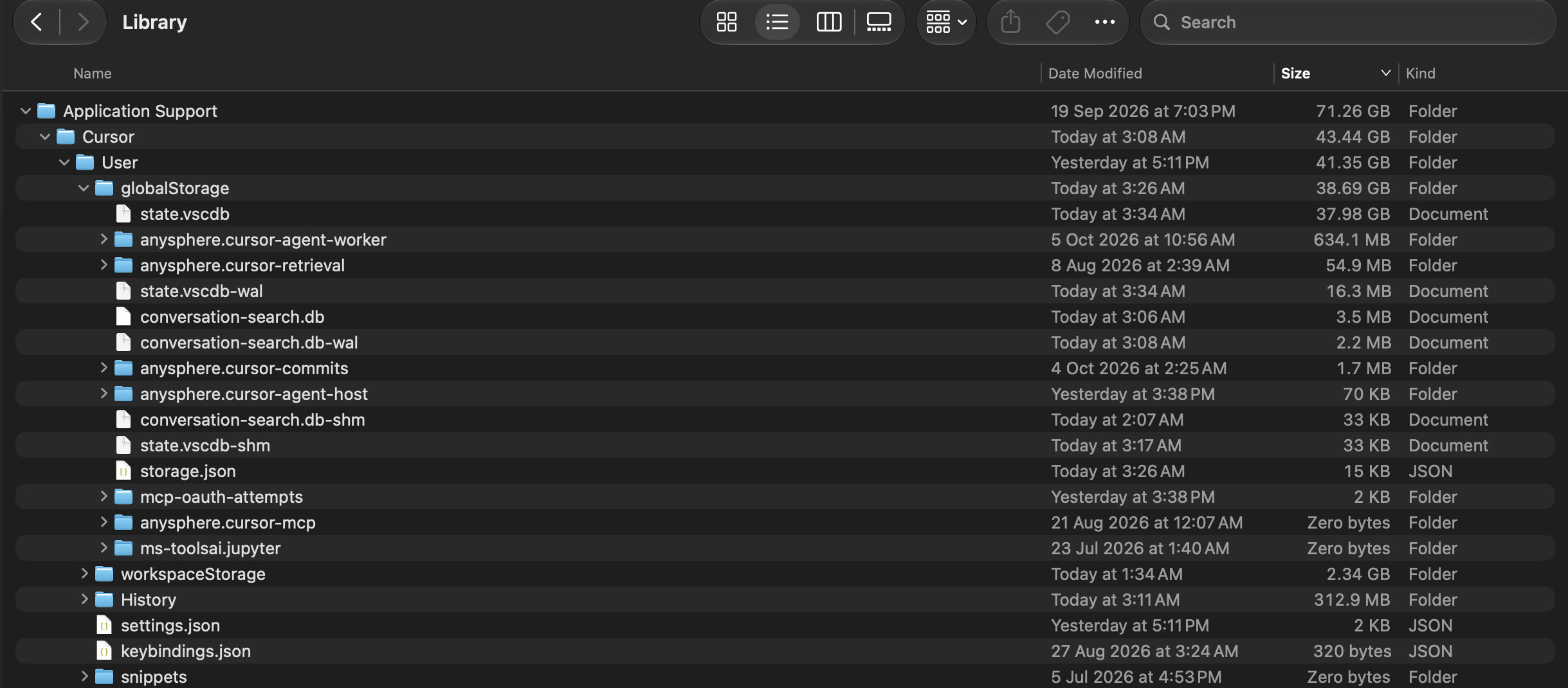
On your Mac, press ⇧⌘G to open a path in the table and use list view. If folder sizes are missing, enable “Calculate all sizes” in View Options, or select a folder and press ⌘I for Get Info. Wait for calculation to finish before comparing with Terminal.
06 / Browse fewer folders
Prefer an automatic scan? Find Cursor usage with AgentClean
AgentClean v1.0.0 can automatically scan Cursor’s local cleanup items. Review the results and cautions first, then select what to handle. Actual coverage depends on your current version’s scan results; you still decide whether to keep data involving history and working state.
Start by checking caches, old logs, update leftovers and old CLI versions. The main chat database state.vscdb is outside the current cleanup scope. If it accounts for most space, follow the Cursor built-in maintenance instructions above.
Stay tuned
AgentClean is currently available only for Mac. Other platforms aren’t available yet. Visit this site on a Mac to download.
Scanned size is not a promise of space you can free. After cleanup, you can verify using this page’s du / df method.
07 / Frequently asked questions
What else should you check before cleaning Cursor?
Does clearing Cursor caches delete chat history?
After quitting Cursor completely, cleaning only the regenerable Cache, Code Cache, GPUCache and CachedData folders listed here does not target chats for deletion. Do not empty User/workspaceStorage, User/globalStorage, state.vscdb or the entire Cursor data directory as caches: they contain persistent state, and accidental deletion can lose chats or make them impossible to open.
Can I delete state.vscdb.backup?
It is a recovery copy, not ordinary cache. For some versions, the official forum suggests moving old backups away after confirming the main database and chats work and quitting Cursor completely. You will lose that recovery safeguard. Export important records first and keep backups you need on an external disk. Renaming or moving them on the same disk does not free space.
Will reinstalling Cursor clear this data?
Removing or replacing Cursor.app alone usually leaves state and caches in your user Library, so disk usage may persist after reinstalling. To free space, measure first and handle folders individually. A complete app reset is not a cleanup method that preserves history.
What if a path is missing or Terminal says Operation not permitted?
Folders vary with Cursor version, features used, configuration and custom data paths; skip missing ones. Operation not permitted means the read was incomplete, not zero usage. Check the path and Terminal’s file access permissions first; do not use sudo to force deletion. Data in remote SSH environments or containers is not necessarily local Mac usage.
Can AgentClean v1.0.0 scan Cursor automatically?
Yes. AgentClean v1.0.0 scans Cursor’s local cleanup items and shows results for review and selection before cleanup. Exact items and cautions depend on your current version’s actual scan results. The size of scannable data is not guaranteed recoverable space, and scanning does not promise lossless chat database maintenance.
Sources and verification notes
- Official Cursor forum: database, backup and log measurements on a MacBook Air
A report from a Cursor 3.7.12 user; support explains database backups and built-in maintenance. The sizes are individual examples, not average usage.
- Official Cursor forum: 125 GB usage and cleanup while preserving chat history
Support replies from September 2026: measure first, compact orphaned data, and consider the cautions about deleting old chats and exporting records.
- Official Cursor forum: Excessive Storage in MacBook (original Finder image)
A real Finder screenshot posted by Akshat_Gupta on October 6, 2026. Support explains why space may remain occupied after compaction.
- Official Cursor forum: macOS cache paths and fully quitting the app
Support explicitly lists Cache, CachedData, GPUCache and Code Cache and notes that reinstalling does not reset this state.
- Official Cursor forum: .pack eating up disk space
A snapshot growth example from Cursor 2.6.x. Deleting snapshots loses saved checkpoints; this is not lossless cache cleanup.
- Apple: Free up storage space on Mac
When the Trash releases space, storage categories and the meaning of System Data.
- Apple: About Time Machine local snapshots
Local snapshot retention and why macOS counts snapshot space as available storage.
- SQLite: VACUUM
Database files may not shrink after deleting records. Compaction may need free space up to roughly twice the original file size.