
01 / About the tool
What is Claude Code, and what does it store locally?
Claude Code
Understand code · Edit files · Run commandsClaude Code is Anthropic's coding agent. You can use it in a terminal with the claude command or through interfaces such as an editor. Alongside caches and logs, it stores working data for resuming conversations, remembering projects, and restoring files.
CLI and installation files
Runtime data is stored in ~/.claude by default. Native, npm, and Homebrew installations use different installation locations.
Caches and logs
Features such as debugging, runtime statistics, and release notes leave local files. Some older directories only appear in earlier versions.
Sessions and project memory
Sessions, auto memory, file snapshots, and task lists can matter to ongoing work. Review them separately before deciding what to keep.

AgentClean brings matching Claude Code items together. Review their paths, sizes, and risks, then choose what to clean.
Stay tuned
AgentClean is currently available only for Mac. Other platforms aren’t available yet. Visit this site on a Mac to download.
02 / Cleanup coverage
How are CLI caches, logs, and old versions handled?
Review these six categories, then expand each one to check its paths and conditions. The terminal CLI alone can be scanned. Usage summaries and removed items may still be useful, so avoid selecting everything at once.
Local CLI caches
Includes matching contents of the local cache directory, such as cached release notes. Using the relevant features again may fetch the data again.
View locations and cleanup conditions
Matches contents under cache without a shared age filter. Coverage is limited to this cache directory; it does not mean clearing all of ~/.claude or every system temporary directory.
~/.claude/cacheDebug logs and older logs
Debug logs can help diagnose runtime problems. Keep the relevant records while an issue is unresolved or if you need to share them with support.
View locations and cleanup conditions
Matches under debug have no age filter. Items under logs are selected only if they were last modified more than 30 days ago. Newer versions may no longer create some older directories, so their absence from a scan is not necessarily a problem.
~/.claude/debug~/.claude/logsTelemetry and runtime statistics
Covers local records under telemetry and statsig. Whether these directories exist and how much space they use depends on the version and how it has been used.
View locations and cleanup conditions
Matches in these two directories have no age filter. Deleting local files does not turn off telemetry or delete data already sent to servers. usage-data is a separate caution item.
~/.claude/telemetry~/.claude/statsigUsage statistics cache
stats-cache.json stores historical usage statistics. Deleting it loses the summaries saved in that file, and full recovery is not guaranteed. Keep it if you need to review past usage.
View locations and cleanup conditions
Matches only the stats-cache.json file. Although the current rules do not mark it as a caution item, check whether you need historical statistics first. It is separate from session records and /insights analysis data.
~/.claude/stats-cache.jsonStaged removed plugins and skills
Handles .trash contents under plugins and skills. Cleaning them removes the opportunity to restore removed items from these staged files.
View locations and cleanup conditions
Covers only the two .trash subdirectories, with no age filter. Do not delete plugins, skills, or settings that are still in use. These directories are also separate from the macOS Trash.
~/.claude/plugins/.trash~/.claude/skills/.trashOld native CLI versions
Native installations store version files locally. Confirm that updates have finished and all related tasks have exited, then review whether you still need the older versions.
View locations and cleanup conditions
When the ~/.local/bin/claude link can be resolved, the version it points to is kept, along with the most recently modified one of the remaining versions. If the link is missing, only the most recently modified version is kept. If the link exists but is invalid, cleanup is skipped. This rule does not cover global npm packages or Homebrew installation directories.
~/.local/share/claude/versions~ in a path means the current user's home folder. These are default locations. After changing CLAUDE_CONFIG_DIR, coverage of a custom directory is not guaranteed. The old native version rule is also separate from the rules for npm, Homebrew, and Claude Desktop.
03 / Assess the risks
Decide which sessions, auto memory, and file snapshots to keep
The following data can also be scanned, but the current rules mark it for caution and do not apply a shared 30-day filter. Appearing in a scan does not mean an item has expired. Deselect items you want to keep or add protection.
Project sessions and auto memory
~/.claude/projects~/.claude/transcriptsprojects may contain sessions, tool output, and memory auto memory together. Cleaning related items can affect resumed conversations, context review, and memory. Protect projects you need to continue working on.
File history and restore snapshots
~/.claude/file-historyStores snapshots of files before edits. Deleting them affects restoration from earlier checkpoints. The fact that your code still exists does not mean these records are no longer useful.
Plans, to-dos, and tasks
~/.claude/plans~/.claude/todos~/.claude/tasksMay contain plans and task lists that are still in progress. Confirm the work is complete and save any plans you need elsewhere before cleaning. Older directories vary by version.
Shell snapshots and input history
~/.claude/shell-snapshots~/.claude/history.jsonlEnd related terminal tasks first. history.jsonl supports reviewing previous input and searching history. Deleting it loses these records; it is not an ordinary debug log.
Pasted content and usage analysis
~/.claude/paste-cache~/.claude/usage-dataThe paste cache may hold long text from past input. usage-data may contain /insights reports and analysis data. Keep them if you need to refer back to them.
Feedback materials and drafts
~/.claude/feedback-bundles~/.claude/feedback/draftsMay contain unsent bug reports, attachments, or drafts. Keep them while an issue is being investigated, and save any materials you need elsewhere first.
Old settings backups
~/.claude.json.backup*Matches only this backup naming pattern in the home folder, not the current .claude.json. Keep backups if you may need to restore settings. This does not imply that other backup locations are covered.
The current rules do not target ~/.claude.json, settings.json, credential files, CLAUDE.md, agent-memory, or plugins and skills that are in use. Project code, project .claude settings, and working copies should not be treated as caches. Do not empty the entire ~/.claude or plugins directory.
Deletion is permanent. Files are not moved to the Trash. Back up any sessions and files you need first. Keep items whose purpose you are unsure of.
04 / Product interface
Review the Claude Code scan and protection interface
These English-interface screenshots show the review state before cleanup. The totals at the top and bottom include multiple tools and do not represent space that Claude Code alone can free. Protected indicates protection already set in the screenshot; it does not mean all project sessions are protected by default.
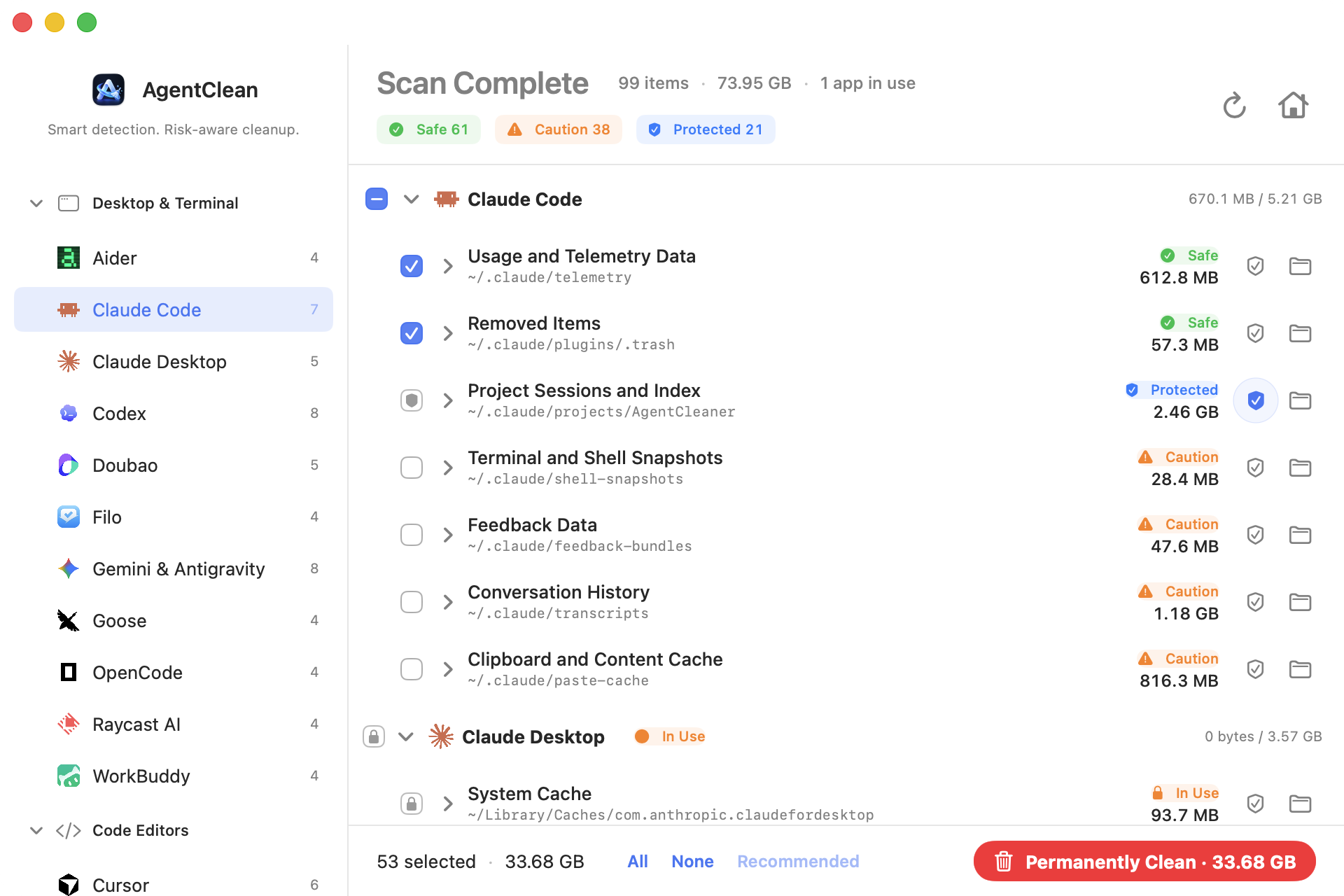
Expand the Claude Code group and use paths to distinguish telemetry, removed items, sessions, shell snapshots, and history. Claude Desktop appears below as a separate group.

A detail from the same screenshot: project sessions show Protected, while shell snapshots show Caution and are unchecked. Add protection to important projects as needed.
05 / Example workflow and FAQs
Clean caches and logs while keeping the data you need to continue working
For your first cleanup, start with caches and logs you are sure you no longer need. Review the installation method and running tasks separately before removing old native versions. You do not need to select them just to free more space.
- 01
End CLI and background tasks
Save project files, end Claude Code tasks in terminals and editors, and confirm that installation and updates have finished. Open AgentClean, grant the requested access, and scan.
- 02
Deselect all, then review caches and logs
Find the Claude Code group and select only caches or logs you are sure you no longer need. Keep records needed for troubleshooting. Deselect Claude Desktop and items from other tools.
- 03
Protect sessions, memory, and snapshots
Leave caution items such as
projects,file-history, andhistory.jsonlunchecked, and protect important projects. Also keep any usage summaries, plans, tasks, and feedback materials you need. - 04
Check paths and verify after cleanup
Confirm the selected paths before permanently deleting them. Review the cleanup results, then run
claude --versionto check the CLI. Return to your project and confirm that the sessions, memory, and plugins you need are still available.
This is an example of choosing cleanup scope, not a measurement of recovered storage. Check Claude Code's own data retention periods separately from AgentClean's scan coverage and selected items.
Manual guide / Log locations and risksWhere are Claude Code logs, and which records should you keep?Find debug logs and session records, check custom directories, and measure disk usage before deciding what to delete manually.Frequently asked questions
Can I clean up Claude Code if I only use the terminal CLI?
Yes. The current rules directly cover default locations such as caches and debug logs under ~/.claude, plus the native installation's version directory. Claude Desktop is not required. This page covers local Mac directories; data in Windows, WSL, containers, and remote hosts is outside this scope.
Are old versions from native, npm, and Homebrew installations all supported?
The old version rule applies only to ~/.local/share/claude/versions and checks the ~/.local/bin/claude link. Global npm packages and Homebrew installation directories are outside this rule. Runtime data in the default ~/.claude directory is matched by its actual path. You can use claude doctor to check your installation first. Do not manually empty versions or delete program files while updates or tasks are running.
Will data still be found automatically after changing CLAUDE_CONFIG_DIR?
This is not guaranteed. Claude Code supports custom configuration and state directories, while AgentClean's current rules use default paths such as ~/.claude. This does not imply coverage of custom directories, temporary data under CLAUDE_CODE_TMPDIR, or new directories not listed here.
Will my past sessions, auto memory, and file restoration still be available after cleanup?
It depends on what you select. projects, transcripts, file-history, and history.jsonl are all scannable caution items. They are not automatically excluded simply because they contain history. To retain resumed conversations, auto memory, and checkpoint restoration, keep the relevant directories, protect important projects, and select only caches or logs you are sure you no longer need.
Does Claude Code's built-in cleanup use the same rules as AgentClean?
No. Claude Code has its own retention periods and cleanup mechanisms for some data. AgentClean uses independent matching rules. The logs category on this page has a condition of more than 30 days, but caution items such as projects, file-history, plans, and tasks have no shared 30-day filter. An item appearing in a scan does not mean it has expired.
Will Claude Desktop and installed plugins be cleaned at the same time?
This page describes the Claude Code group. Claude Desktop is a separate group with its own cache and runtime rules. For plugins and skills, this page covers only the .trash subdirectories, not the entire plugins or skills directories. Deselect other tools and Claude Desktop during cleanup, and keep current settings, plugins in use, and project files.
Can I delete everything labeled Safe? Does the scanned size equal the space I will recover?
Neither follows from those labels or numbers. A statistics cache may store past usage, and .trash may contain items you want to restore. Select each item based on its purpose. The overview totals in the screenshots also include other tools. Actual space recovered depends on your selection, protection settings, deletion results, and files being regenerated. AgentClean permanently deletes selected files without moving them to the Trash. Back up important data first.
References
- Claude Code official documentation: Overview
- Claude Code official documentation: Installation and version management
- Claude Code official documentation: Local directories and data
- Claude Code official documentation: Settings and custom locations
- Claude Code official documentation: Checkpoints and file restoration
06 / Download
Clean up Claude Code with AgentClean
For macOS
Stay tuned
AgentClean is currently available only for Mac. Other platforms aren’t available yet. Visit this site on a Mac to download.